
According to research, the average lifespan of a website is 2 years and 7 months.
In the ever-evolving digital landscape, maintaining an effective and visually appealing website is crucial for businesses to thrive. However, as technologies advance and user expectations evolve, there comes a time when website redesign becomes imminent. Whether it’s to improve user experience, enhance functionality, or align with changing business goals, a website redesign is a strategic investment that can yield significant returns.
To embark on a successful website redesign journey, a well-defined roadmap is essential. This comprehensive guide will take you through the entire process, step by step, ensuring that you have a clear understanding of the key considerations, best practices, and necessary actions to undertake for a successful website redesign.
Table of Contents:
1. Assessing the Need for a Website Redesign
2. Defining Business Goals and Objectives
3. User Experience (UX) and User Interface (UI) Design
4. Content Strategy and Information Architecture
5. Search Engine Optimization (SEO) Considerations
7. Technical Implementation and Development
8. Testing, Quality Assurance, and Launch
1. Assessing the Need for a Website Redesign
In today’s fast-paced digital world, where user expectations are constantly evolving, it’s crucial to regularly evaluate your website’s performance to determine if a redesign is necessary. This assessment will help you identify areas for improvement, align your website with current best practices, and ensure it effectively meets the needs of your target audience. Here are the key questions to assess the need for a website redesign:
- Are you experiencing a decline in traffic or high bounce rates ? Are visitors spending lesser time on your site?
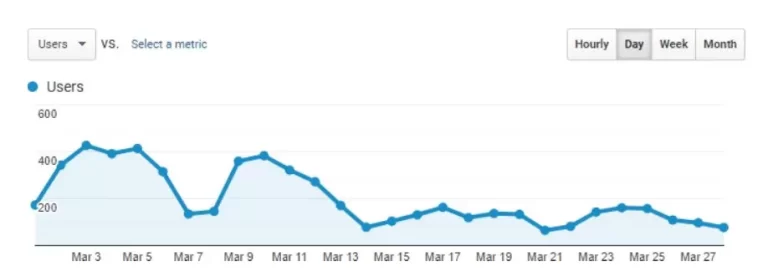
Image source- Moz.com
- Does your website look outdated compared to your competitors?
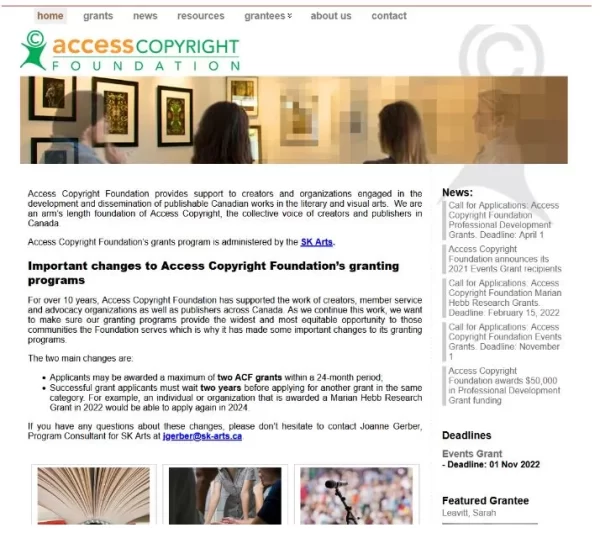
Arete Soft Labs redesigned the website Access Copyright Foundation recently.
- Is your website difficult to navigate leading to a poor user experience?
- Are you receiving negative feedback from users regarding the website’s functionality or design?
- Has your business undergone significant changes in branding, products, or services that are not reflected on your website?
If you find that your website falls short in any of these areas, it’s a strong indication that a redesign is necessary to address these issues and improve the overall user experience.
2. Defining Business Goals and Objectives for Website Redesign
Now that you have assessed and confirmed that you need a redesign for your website, it’s time to dive deeper into the process and define your business goals and objectives. A website redesign should not be treated as a mere cosmetic makeover; it presents an opportunity to align your online presence with your overarching business strategy and drive meaningful results.

When undertaking a website redesign, it’s crucial to align the redesign with your business goals and objectives. This step ensures that your website becomes a strategic tool that supports your overall business strategy. Refer following key considerations to define your business goals and objectives for the redesign:
-
Identifying your business goals and aligning them with the redesign:
Begin by clearly identifying your business goals. These goals may include increasing online sales, generating leads, improving brand visibility, enhancing customer engagement, or promoting a new product or service. For example, if your goal is to increase online sales, the redesign may prioritize optimizing the checkout process and creating persuasive product pages.
-
Analyzing changes in business focus or expansion plans:
Businesses evolve and it’s important to analyze any changes in your business focus or expansion plans that may impact the website redesign. Have you introduced new product lines, expanded into new markets, or repositioned your brand? Understanding these changes will help you determine how the redesign can reflect and support these shifts effectively. It may involve updating the website’s messaging, showcasing new offerings, or adapting the user experience to cater to a different target audience.
-
Ensuring the website redesign supports future goals and scalability:
While it’s important to address your current goals, it’s equally crucial to consider the future scalability and growth of your business. A website redesign is an opportunity to future-proof your online presence. Is your current website scalable to meet future content updates, new features, or increased traffic? Moreover, anticipate technological advancements, changes in user behavior, and emerging trends to ensure your redesigned website remains relevant and adaptable in the long term.
-
Marketing and business strategies
Align the redesign with your broader marketing and business strategies. Ensure consistency across different channels and touchpoints to provide a cohesive and seamless brand experience. Integrate the website with other marketing tools, such as email marketing platforms or customer relationship management (CRM) systems, to streamline your business processes and enhance customer engagement.
Get Started on Your Website redesign Today?
Free Consultation • No Hidden Fees • 100% Confidential
3. User Experience (UX) and User Interface (UI) Design
Now, it’s time for planning the User Interface (UI) design and User Experience (UX) elements for the new website.
User experience (UX) and user interface (UI) design play a pivotal role in the success of a website redesign. A well-designed user experience ensures that visitors can navigate and interact with your website effortlessly, while an appealing user interface creates a visually engaging and memorable experience.
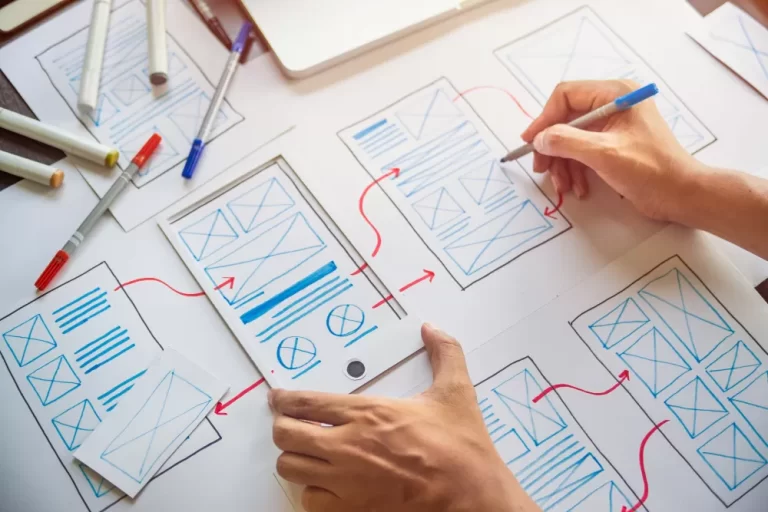
Here are the key aspects to consider when focusing on UX and UI design during a website redesign:
-
Conducting user research and creating user personas:
To design an effective user experience, it’s crucial to understand the needs, goals, and behaviors of your target audience. Conduct user research through surveys, interviews, and usability testing to gather insights about their preferences, pain points, and expectations. This research will help you create user personas, fictional representations of your target users, which serve as a reference point throughout the redesign process. User personas enable you to empathize with your audience and make informed design decisions that align with their needs and motivations.
-
Designing intuitive navigation, appealing layouts, and visual elements:
To design an effective user experience, it’s crucial to understand the needs, goals, and behaviors of your target audience. Conduct user research through surveys, interviews, and usability testing to gather insights about their preferences, pain points, and expectations. This research will help you create user personas, fictional representations of your target users, which serve as a reference point throughout the redesign process. User personas enable you to empathize with your audience and make informed design decisions that align with their needs and motivations.
- Navigation – Navigation is a critical component of a user-friendly website. Design intuitive navigation menus and site architecture that allow visitors to find information quickly and effortlessly. Plan to implement breadcrumb trails, search functionality, and clear calls-to-action to guide users through the website and facilitate their journey.
- Layout & visual elements- When it comes to layouts and visual elements, strive for simplicity and consistency. A few points to consider:
- Use a grid system to create a well-organized and balanced layout that accommodates different screen sizes.
- Typography is important . Use legible fonts and appropriate font sizes for easy readability.
- Use white space in the design to improve visual clarity and guide users’ attention to key elements.
- Use images, illustrations, and videos to enhance the overall user experience. Use high-quality visuals that align with your brand and effectively convey your message. However, ensure that the visual elements are optimized for quick loading times without compromising their quality.
- Use color psychology to evoke the desired emotions and create a cohesive visual experience. Choose a color palette that aligns with your brand identity and creates a visual hierarchy, guiding users to important elements on the page. Use contrasting colors for buttons and links to make them stand out and encourage interaction.
4. Content Strategy and Information Architecture
Content strategy and information architecture are vital components of a successful website redesign. They ensure that your website’s content is organized, and engaging, and effectively communicates your brand message. Here are the key considerations:
-
Assessing your current content strategy and identifying gaps:
- Begin by evaluating your current content strategy. Assess the quality, relevance, and effectiveness of your existing content.
- Identify any gaps or areas where content may be outdated or no longer aligned with your business goals.
- Review user feedback, analytics data, and content performance metrics to gain insights into what content is resonating with your audience and what may need improvement.
This assessment will help you determine which content elements should be retained, updated, or created from scratch during the redesign process.
-
Defining content goals and aligning them with user needs:
When redesigning your website, it’s essential to align your content goals with the needs and expectations of your target audience. Start by defining your content goals, such as educating, informing, inspiring, or entertaining your users. Consider the following points:
- the specific information your audience is seeking,
- their pain points,
- how your content can provide value and address their needs.
Develop a content strategy that aligns with these goals, ensuring that each piece of content serves a purpose and contributes to a cohesive user experience.
5. Search Engine Optimization (SEO) Considerations for Website Redesign
Search engine optimization (SEO) is a crucial aspect of any website redesign. It ensures that your website is visible to search engines and ranks well in search engine result pages (SERPs), your SEO ranks are not impacted by redesign efforts. By incorporating SEO considerations into your redesign process, you can attract more organic traffic, increase your online visibility, and reach your target audience effectively.
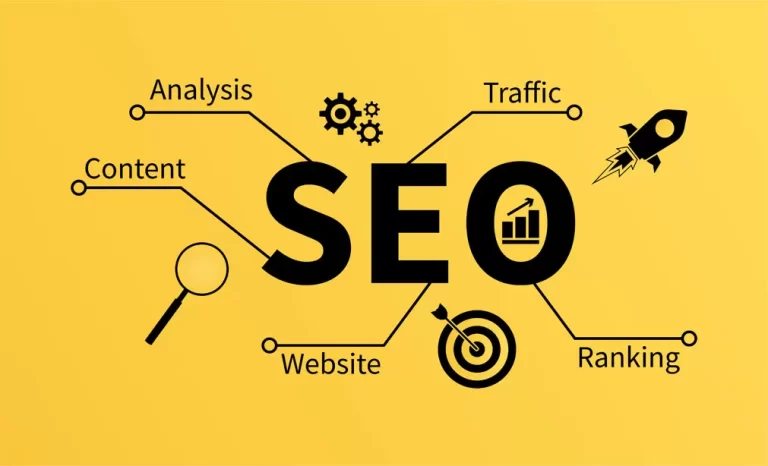
Here are the key SEO considerations to keep in mind during a website redesign:
-
Analyzing current SEO performance and identifying areas for improvement:
Start by evaluating your website’s current SEO performance.
- Review your organic search traffic,
- keyword rankings,
- backlink profile.
Identify any issues or areas for improvement, such as pages with low rankings, high bounce rates, or technical errors that may be impacting your website’s search visibility. This analysis will help you understand the strengths and weaknesses of your current SEO strategy and guide your efforts during the redesign process.
-
Conducting keyword research and optimizing on-page elements:
Keyword research is essential for understanding the search terms your target audience is using to find products or services similar to yours. Identify relevant keywords that align with your business offerings and have a good search volume. Use keyword research tools like Google Keyword Planner , SEMrush , or Moz to gather data on search volume, competition, and related keywords.
Optimize your on-page elements to incorporate these keywords naturally. This includes optimizing your page titles, meta descriptions, heading tags (H1, H2, etc.), and image alt tags. Ensure that your content provides value to users while incorporating relevant keywords in an organic manner.
-
Creating an SEO-friendly URL structure and implementing redirects:
- Creating an SEO-friendly URL structure that is both user-friendly and easily understood by search engines is critical. Use descriptive and relevant keywords in your URLs to give search engines additional context about your page’s content. Keep your URLs concise and clean. Avoid any unnecessary parameters or session IDs.
- If you’re changing your URL structure or page URLs during the redesign process, implement proper redirects to ensure a smooth transition and avoid broken links.
- Set up 301 redirects from old URLs to new URLs to preserve the link equity and authority built over
- Update your internal links to point to the new URLs to maintain a strong internal linking structure.
-
Optimizing website speed and performance:
Did you know that 47% of consumers expect a web page to load in two seconds or less? Slow-loading pages can lead to higher bounce rates and lower search engine rankings. Optimize your website’s performance by
- Compressing images,
- Minifying CSS and JavaScript files,
- Utilize browser caching.
- Use a content delivery network (CDN) to improve loading times for users in different geographical locations.
-
Implementing structured data and schema markup:
Websites with structured data and schema markup have a 36% higher click-through rate (CTR) on search engine results pages. Structured data and schema markup helps search engines understand the context and meaning of your content, enabling them to display rich snippets or other enhanced search results.
Implement structured data using JSON-LD or other recommended formats to enhance your website’s visibility and improve the chances of appearing in featured snippets or other search engine result features.
Get Started on Your Website redesign Today?
Free Consultation • No Hidden Fees • 100% Confidential
6. Mobile Responsiveness
In today’s digital landscape, having a mobile-responsive website is no longer optional; it’s essential. 61% of users are unlikely to return to a website that they had trouble accessing from their mobile devices. To ensure a positive user experience and maintain a competitive edge, it’s crucial to prioritize mobile responsiveness and optimize the performance of your website.

Here are the key considerations when it comes to mobile responsiveness and performance optimization during a website redesign:
- A mobile-first approach involves designing and developing websites with mobile devices in mind as the primary target. This means creating a seamless user experience for mobile users and then scaling up the design for larger screens. By adopting a mobile-first mindset, you can ensure that your website looks and functions optimally on mobile devices.
- Design responsive layouts that adapt and adjust based on the screen size and orientation of the device being used. Utilize fluid grid systems, flexible images, and CSS media queries to ensure that your website’s content and design elements automatically adjust to provide an optimal viewing experience across various devices.
- Consider the mobile user’s context and behavior when designing for mobile. Simplify navigation, prioritize important content and calls to action, and make sure that text is easily readable without zooming. Optimize form inputs for touch interactions and ensure that buttons and links are large enough to be easily tapped with a finger.
7. Technical Implementation and Development
The technical implementation and development phase of a website redesign is critical to bringing your vision to life and ensuring a smooth and successful launch. From selecting the right content management system (CMS) to choosing plugins, themes, and integrations, this phase involves collaborating closely with a web design company and implementing the redesign effectively.

Here are the key considerations during the technical implementation and development phase:
-
Selecting the right content management system (CMS):
A CMS is a crucial foundation for managing and updating your website’s content efficiently. When selecting a CMS, consider factors such as ease of use, scalability, customization options, security features, and community support. Some popular CMS options include WordPress , Drupal, Joomla, and Shopify, each with its strengths and suitability for different types of websites.
Evaluate the requirements of your website and choose a CMS that aligns with your needs. Consider factors like the complexity of your content, e-commerce functionality, multi-language support, and third-party integrations. Work closely with your web development team to ensure the chosen CMS is compatible with your desired design and functionality.
-
Choosing appropriate plugins, themes, and integrations:
- Plugins and themes dd additional functionality and customization options to your website. Choose plugins that align with your specific needs, such as SEO optimization, caching, security, analytics, and social media integration. Be mindful of the plugin’s reputation, user reviews, and compatibility with your chosen CMS.
- Select a theme or design framework that aligns with your website’s goals and branding. Choose a responsive theme that offers flexibility, customization options, and clean code for optimal performance. Consider working with a professional web designer to create a custom theme tailored to your unique requirements.
- Integrations with third-party services, such as email marketing platforms, customer relationship management (CRM) systems, payment gateways, or analytics tools, may be necessary to streamline your business operations. Select integrations that enhance your website’s functionality and align with your business goals.
8. Testing, Quality Assurance, and Launch
The testing, quality assurance, and launch phase is a critical step in the website redesign process. Thorough testing and quality assurance checks ensure that your website functions properly, provides a seamless user experience, and meets your business goals.
- Test your website on popular web browsers such as Chrome, Firefox, Safari, and Edge to ensure that it displays correctly, and functions as intended. Pay attention to any design or functionality issues that may arise on different browsers.
- Test your website on various mobile devices, including smartphones and tablets, to ensure responsiveness and optimal performance. Emulators, simulators, and real devices can be used to replicate the user experience on different platforms.
- Perform usability testing to assess the intuitiveness and user-friendliness of your website. Ask users to complete common tasks and observe their interactions to identify any areas that may cause confusion or frustration. Incorporate feedback from usability testing to make necessary improvements.
- Review your website’s content for accuracy, consistency, and proper formatting. Proofread all text to ensure correct grammar, spelling, and punctuation.
- Validate any data entry fields, such as forms and search bars, to ensure that they accept and process user input correctly.
- Optimize image sizes, minify CSS and JavaScript files, and enable caching to improve performance.
- Validate the website’s HTML, CSS, and code to ensure compliance with web standards.
Get Started on Your Website redesign Today?
Free Consultation • No Hidden Fees • 100% Confidential
Conclusion
A website redesign is not just about aesthetics; it is a strategic process that aligns your online presence with your business goals and user expectations. By following this comprehensive guide, you will be equipped with the knowledge and tools to undertake a successful website redesign. Remember, the key to a successful redesign is thorough planning, clear objectives, and continuous improvement based on user feedback and data analysis. With the right roadmap and a commitment to excellence, your redesigned website will be a powerful tool that enhances your brand, engages your audience, and drives your business toward long-term success.