In today’s digital era, achieving online success requires more than just a functional website. It’s crucial to ensure that your website is optimized for search engines to drive organic traffic, boost visibility, and increase conversions. Search engine optimization (SEO) goes beyond content and keywords – web design plays a significant role in determining your website’s ranking on search engine results pages (SERPs).
In this blog post, we will delve into nine important tips for designing a website that is visually appealing and search engine friendly. We will cover various aspects, including website structure, navigation, mobile responsiveness, page loading speed, and more. Whether you’re a business owner, web designer, or digital marketer, these tips will provide actionable insights to enhance your website’s SEO performance.
So, let’s delve into the world of web design optimization and discover how you can elevate your search engine rankings, attract more organic traffic, and deliver an exceptional user experience. Get ready to unlock the full potential of your website for online success!
1. Responsive Web design
In today’s rapidly evolving digital landscape, catering to mobile users has become imperative for website owners. With more than 60% of website traffic coming from mobile devices , it’s crucial to prioritize mobile-friendly design. Mobile-friendly design entails creating a website that adapts seamlessly to different screen sizes and offers an intuitive browsing experience for mobile users. By embracing mobile-friendly design principles, you can enhance user engagement, improve search engine rankings, and ensure that your website remains competitive in the mobile era.
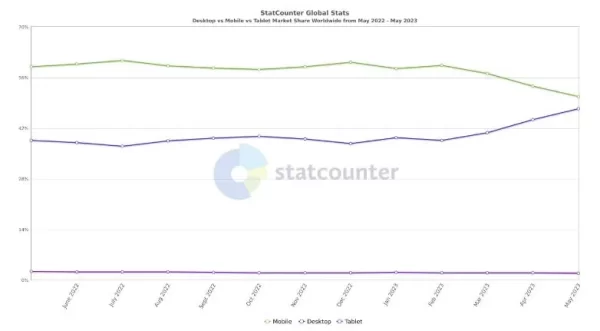
Image source: www.statcounter.com
So, let’s take a closer look.
Why it’s crucial to have a mobile-friendly design for your website?
- The user experience is greatly influenced: by having a mobile-friendly design. When users access websites on their mobile devices, they expect effortless navigation, legible content, and fast-loading pages. If your website is not optimized for mobile, it can result in a frustrating user experience, leading visitors to abandon your site and seek alternatives.
By implementing mobile-friendly design practices, you can meet the expectations of mobile users, leading to improved engagement, longer visit durations, and increased conversion rates. - Mobile-friendly design: plays a vital role in search engine optimization (SEO). Search engines like Google prioritize mobile-friendly websites in their search results. They consider various factors, including responsive design, mobile page speed, and mobile usability when ranking websites. A mobile-friendly website can positively impact your SEO efforts, resulting in enhanced visibility, increased organic traffic, and improved search rankings.
- Expanded Audience Reach: The majority of internet users now access the web through their mobile devices. If your website is not mobile-friendly, you risk alienating a significant portion of your target audience. When you optimize your website for a mobile-friendly design, you ensure that your website is accessible to users across various devices and screen sizes. This allows you to reach a broader audience and connect with potential customers who primarily use mobile devices for their online activities.
Need a Website That Grows Your Business?
Free Consultation • No Hidden Fees • 100% Confidential
2. Keyword Research and Optimization
Keyword research and optimization are crucial aspects of SEO-friendly website design . When users search for information or products online, they typically use specific keywords or phrases.
By conducting thorough keyword research, you can identify the relevant keywords that your target audience is searching for. Once you have identified these keywords.
- You can strategically incorporate them into your website’s content, meta tags, headings, and URLs. This helps search engines understand the relevance of your website to specific search queries and improves your chances of appearing in relevant search results.
When optimizing your keywords, it’s essential to strike a balance between using them naturally within your content and avoiding keyword stuffing. Keyword stuffing, which involves excessively and unnaturally cramming keywords into your content, can be detrimental to your SEO efforts and may result in penalties from search engines.

Image source: www.Aretesoftware.ca
- Incorporating keywords in page elements is a critical factor in optimizing your website’s content for search engines. When it comes to SEO, keywords play a significant role in determining how search engines interpret and rank your web pages.
When you incorporate keywords in your page elements, you’re providing search engines with valuable information about the relevance and topic of your content. This can help search engines understand your website better, improve its visibility in search results, and drive organic traffic to your site.
- Keyword stuffing: Keyword stuffing refers to the excessive and unnatural use of keywords in an attempt to manipulate search engine rankings. This outdated technique involves cramming keywords into your content, meta tags, and other page elements without considering the quality or relevance of the content.

Search engines have become smarter in etecting keyword stuffing and now prioritize high-quality, user-focused content. Keyword stuffing can result in penalties from search engines, leading to lower rankings and decreased visibility.
Instead of keyword stuffing, focus on incorporating keywords naturally and strategically within your content. Conduct thorough keyword research to identify relevant keywords and phrases that align with your content and target audience’s search intent.
Place keywords in key areas such as titles, headings, meta descriptions, and body content. However, prioritize readability and user experience by ensuring that the keywords fit naturally within the context of your content.
Additionally, diversify your keyword usage by incorporating related terms and synonyms. This helps search engines understand the breadth and depth of your content, improving its relevance and visibility in search results.
An example of a page with keyword stuffing.

Image source: www.seranking.com
3. URL Structure and Navigation
a. Importance of clean and user-friendly URLs
According to Wikipedia , a user-friendly URL is:
Clean URLs (also known as user-friendly URLs, pretty URLs, search engine-friendly URLs, or RESTful URLs) are web addresses or Uniform Resource Locator (URLs) intended to improve the usability and accessibility of a website, web application, or web service by being immediately and intuitively meaningful to non-expert users.
Clean and user-friendly URLs play a crucial role in SEO-friendly website design. When search engines crawl your website, they analyze the URL structure to understand the content and relevance of each page.
A clean URL that includes descriptive keywords related to the page topic helps search engines determine the context and improves the chances of ranking higher in search results.
Moreover, clean URLs are more visually appealing and easier for users to read and remember. When users see a clear and concise URL, they have a better understanding of what the page is about, leading to increased click-through rates and improved user experience.
Example of user-friendly URLs (a.k.a. clean URL):
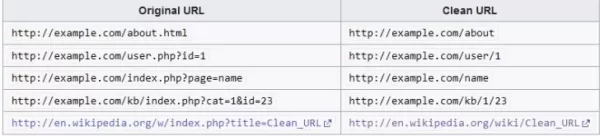
Image: www.wikipedia.org
In addition to search engines and users, clean URLs also benefit your website’s overall architecture and site maintenance. A well-structured URL hierarchy allows for better organization and categorization of content , making it easier to manage and update your website. It also facilitates internal linking, helping search engines discover and index related pages more efficiently.
Overall, clean and user-friendly URLs are a fundamental component of SEO-friendly web design. They contribute to improved search engine visibility, user experience, and website maintenance, making it essential to incorporate them into your website’s design and structure.
b. Organizing website navigation for SEO
Proper organization of website navigation is crucial for both user experience and search engine optimization. When visitors land on your website, they should be able to navigate easily and find the information they need without confusion or frustration. Clear and intuitive navigation enhances user engagement, reduces bounce rates, and increases the chances of conversions.
- Clear navigation structure – From an SEO perspective, well-organized navigation helps search engines understand the structure and hierarchy of your website’s content. It enables search engine crawlers to crawl and index your pages more effectively, leading to improved visibility in search results. When search engines can easily navigate and access your website’s pages, it increases the likelihood of your content ranking higher for relevant search queries.
Example of clear navigation- Desktop
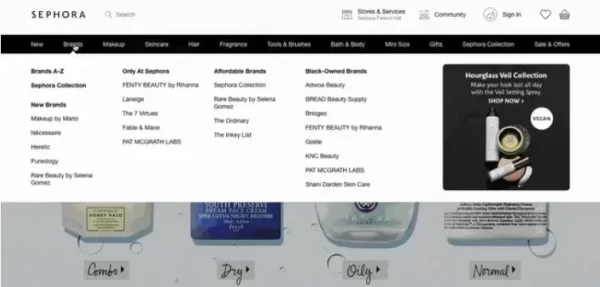
Image source: www.sephora.com
Example of clear navigation- Mobile
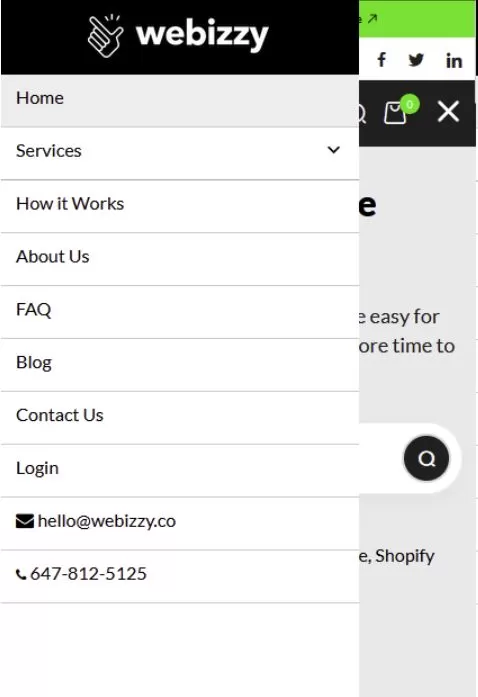
Image source: www.websitemaintenanceservices.store
- Group-related pages – To organize your website navigation for SEO, consider implementing a logical and hierarchical structure. Group related pages under relevant categories and subcategories and ensure that the navigation menu is prominently displayed and accessible from any page.
Use descriptive anchor text for your navigation links that include relevant keywords to provide additional context to search engines. Regularly review and update your navigation as your website grows and evolves to ensure it remains intuitive and user-friendly.
- Internal Linking- Internal linking involves linking relevant pages and content within your website to establish connections and provide a smooth browsing experience for users. Internal links not only help visitors discover more of your content but also distribute link equity and improve the visibility of your pages in search engine results.
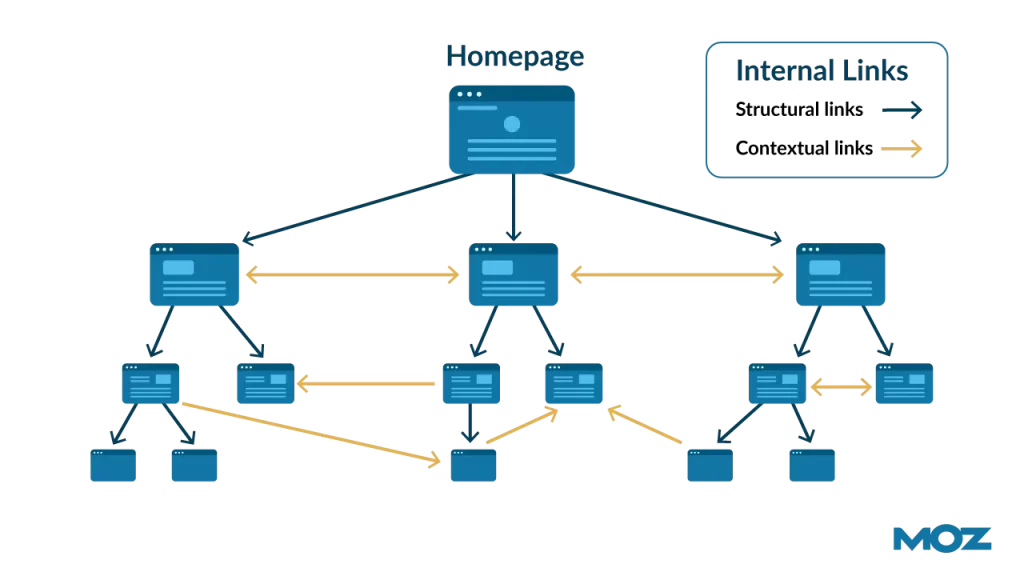
Image source: www.moz.com
By strategically incorporating internal links, you can guide users through your website, enhance the overall user experience, and signal to search engines the importance and relevance of your content.
By organizing your website navigation with SEO in mind, you create a seamless user experience and improve your website’s visibility and rankings in search engines. It’s an essential aspect of SEO-friendly web design that should not be overlooked.
Need a Website That Grows Your Business?
Free Consultation • No Hidden Fees • 100% Confidential
4. Page Speed Optimization
Page speed optimization is a crucial aspect of website design that directly impacts user experience and search engine rankings. Slow-loading websites frustrate users and lead to higher bounce rates while fast-loading websites provide a seamless browsing experience and improve engagement.
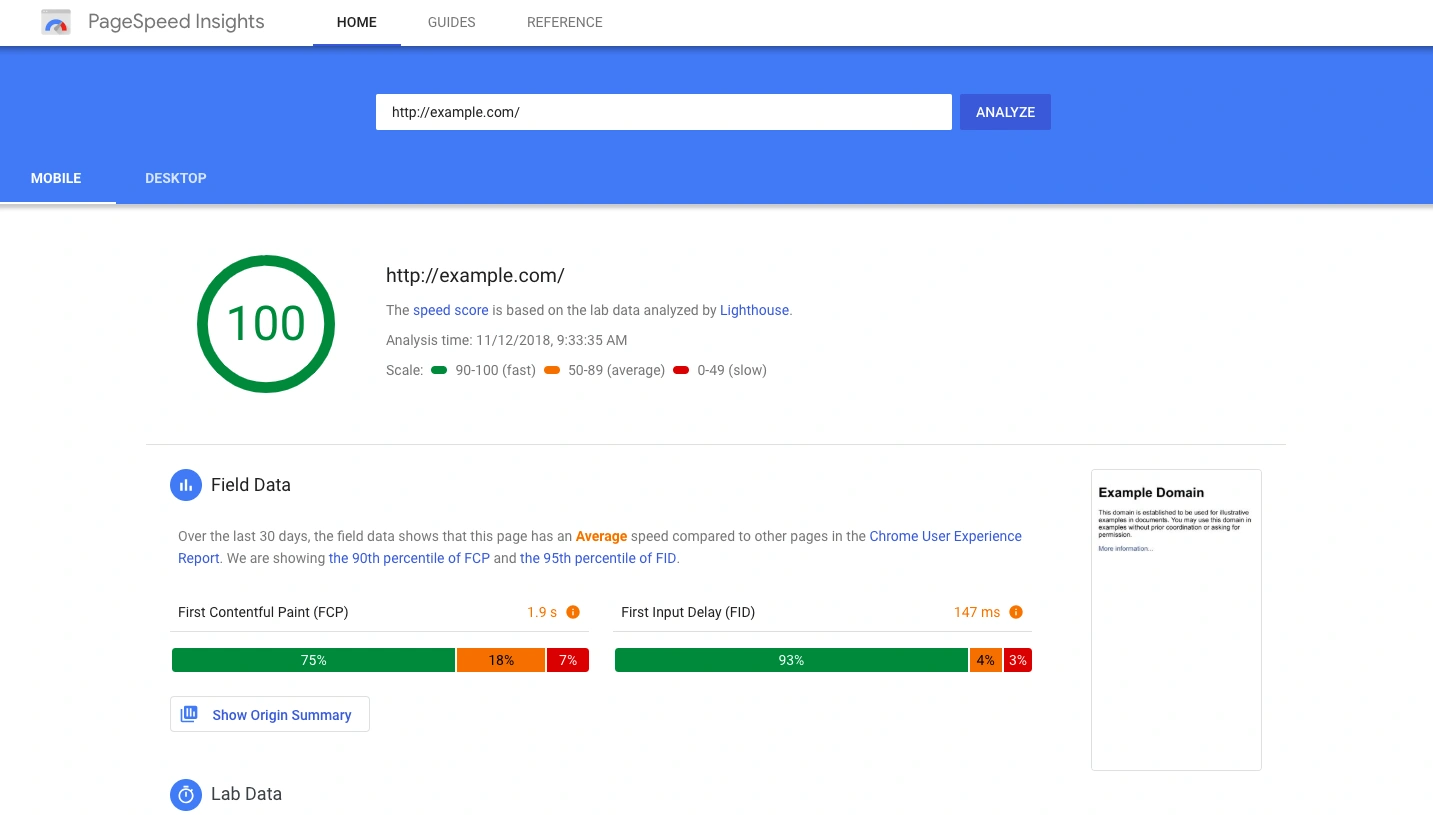
Image source: www.google.com
To optimize page speed, several techniques can be employed.
- Enable caching: Leveraging browser caching allows returning visitors to load your website faster by storing certain elements locally. This reduces the need for repeated server requests and speeds up page load times.
- Compress images: Optimizing image file sizes without compromising quality is essential. Use image compression tools to reduce file sizes and ensure faster loading times. Additionally, consider using responsive images to serve different sizes based on the user’s device.
- Minify CSS and JavaScript: Eliminate unnecessary white spaces, comments, and line breaks in your CSS and JavaScript files to reduce their file sizes. Minification improves load times by decreasing the amount of data that needs to be transferred.
- Use a content delivery network (CDN): A CDN stores copies of your website’s static assets on servers located worldwide, delivering them from the nearest server to the user’s location. This reduces latency and improves loading speed for users across different geographic locations.
- Optimize code and scripts: Analyze your website’s code and scripts to identify and eliminate any redundant or inefficient lines. This can include removing unused CSS and JavaScript, optimizing database queries, and implementing browser caching headers.
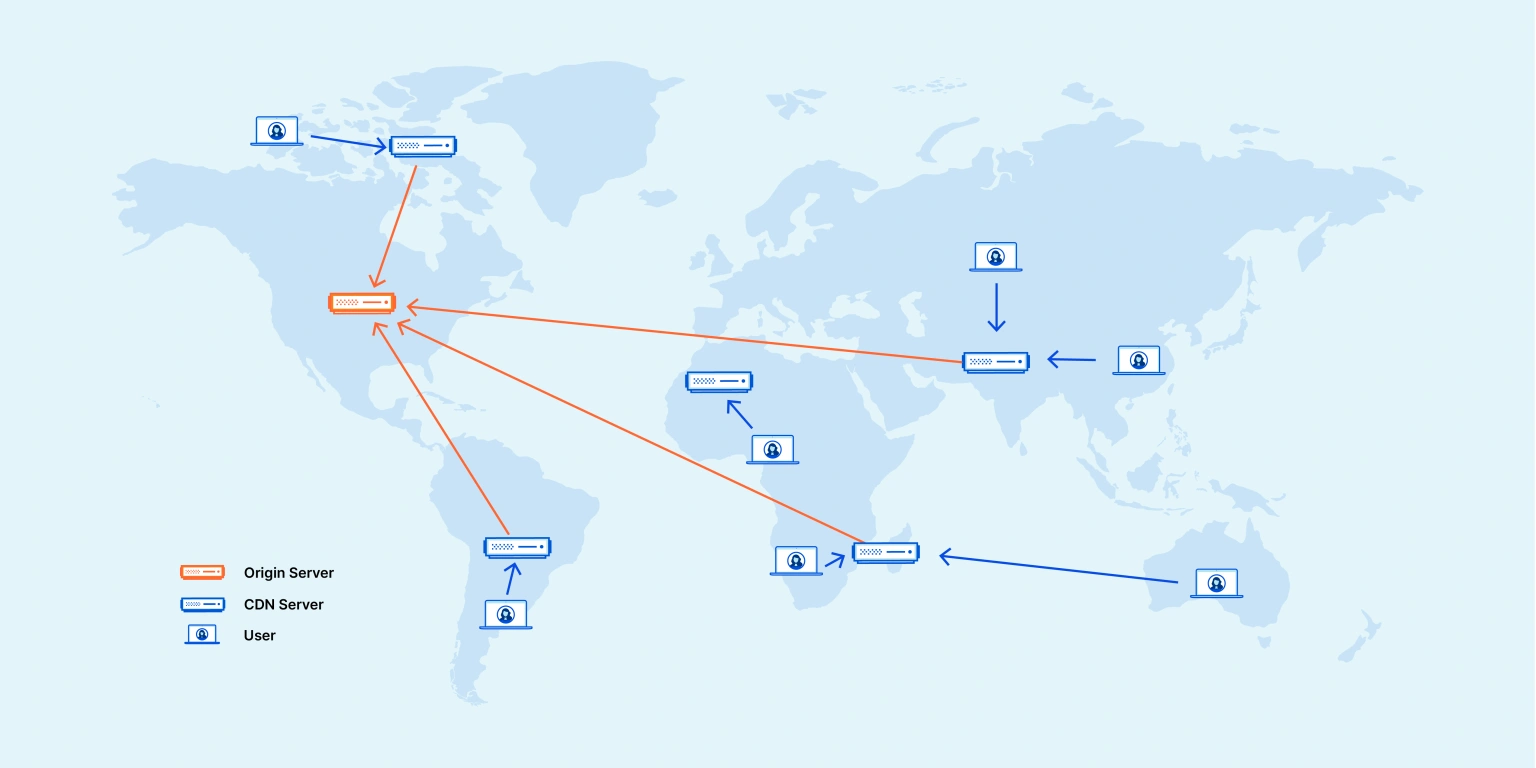
Image source: www.cloudflare.com
- Minimize HTTP requests: Each file request made by a user’s browser adds to the loading time. Reduce the number of HTTP requests by combining multiple CSS and JavaScript files into one, using CSS sprites for images, and removing unnecessary or unused files.
- Implement lazy loading: Lazy loading is a technique that defers the loading of non-critical resources, such as images or videos, until they are about to be viewed. This approach can significantly improve initial page load times and prioritize the loading of essential content.
- Optimize hosting and server resources: Choose a reliable hosting provider that offers fast server response times and sufficient resources to handle your website’s traffic. A well-optimized server environment can contribute to improved page speed.
Remember, page speed optimization is a continuous process, and it’s essential to regularly assess and improve your website’s performance. By implementing these techniques, you can create a faster, more efficient website that provides a better user experience and improves your search engine rankings.
5. Image Optimization
Images play a significant role in enhancing the visual appeal of a website and engaging users. However, if not optimized correctly, images can negatively impact page load times and overall website performance.
Image optimization involves reducing the file size of images without compromising their quality. This process aims to strike a balance between visually appealing images and optimal loading speeds. By optimizing images, you can improve your website’s SEO in several ways.
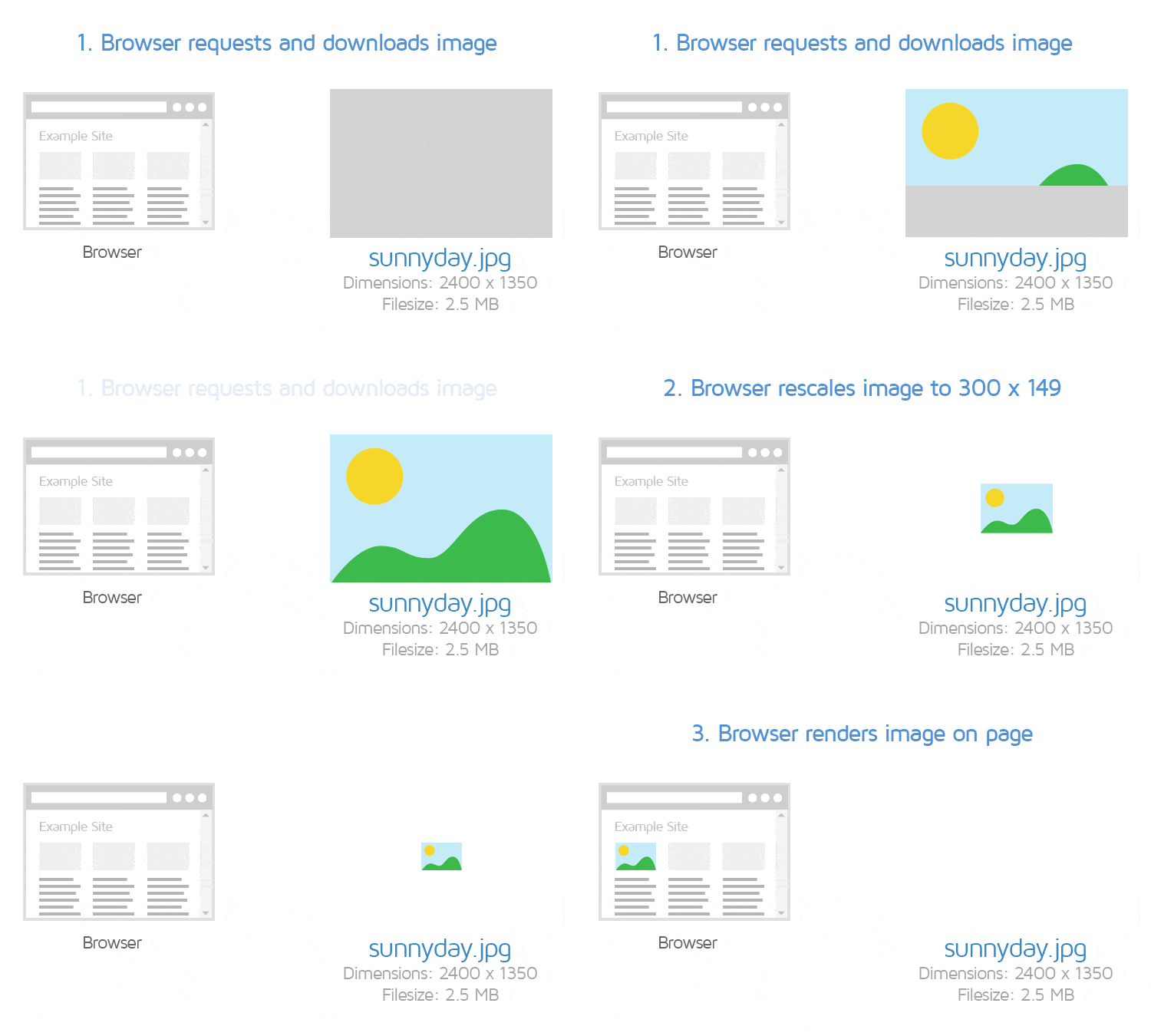
Image source: www.gtmetrix.com
Reasons why image optimization is essential for SEO:
- Image optimization contributes to faster page load times , which is a critical ranking factor for search engines. Websites that load quickly tend to rank higher in search results, providing a better user experience and increasing the likelihood of visitors staying on your site.
- Properly optimized images contribute to improved website accessibility and fast loading speed.
- Image Alt tags- Search engines rely on alt tags, which describe the content of an image, to understand and index images. Including descriptive alt tags not only helps search engines understand the context of your images but also makes your website more accessible to visually impaired users who rely on screen readers.
Best practices for image compression and alt tags:
- Image Compression: Compressing images reduces their file size without compromising quality. Use compression tools or plugins to optimize your images. Aim for a balance between file size reduction and maintaining visual clarity.
- Choose the Right File Format: Select the appropriate file format based on the image type. JPEG is suitable for complex images with gradients or photographs, while webp works well for images with transparency or simple graphics. WebP is a modern image format that provides high compression and quality.
- Optimize Image Dimensions: Resize your images to match the dimensions they will be displayed on your website. Large images scaled down through HTML or CSS can slow down page load times.
- File naming: Use Descriptive Filenames: Give your image files descriptive and relevant names. Use keywords that accurately describe the image content.
Example: Based on the scenario, the image below can be appropriately labeled as “strawberry-ice-cream.webp,” enhancing the understanding of users and search engines regarding the intended role of the images within the content.

Image source: www.rankmath.com
- Alt tags: Add Alt Tags: Alt tags (alternative text) describe an image for search engines and visually impaired users. Use descriptive alt tags that accurately represent the image content and include relevant keywords where appropriate.
Referring to the image example mentioned earlier, the alt text for the image could be set as “Strawberry IceCream.”
- Consider Lazy Loading: Implement lazy loading, a technique that delays the loading of images until they are about to appear in the user’s viewport. This improves initial page load times, especially for websites with multiple images.
- Provide Image Captions: Adding captions to your images can enhance the user experience and provide additional context for search engines. Captions can help improve accessibility and make your content more engaging.
Need a Website That Grows Your Business?
Free Consultation • No Hidden Fees • 100% Confidential
6. Content Structure and Formatting
Well-structured content refers to organizing your website’s information in a logical and hierarchical manner, making it easier for both users and search engines to navigate and understand your content. It’s the foundation of excellent SEO and user experience for every website.
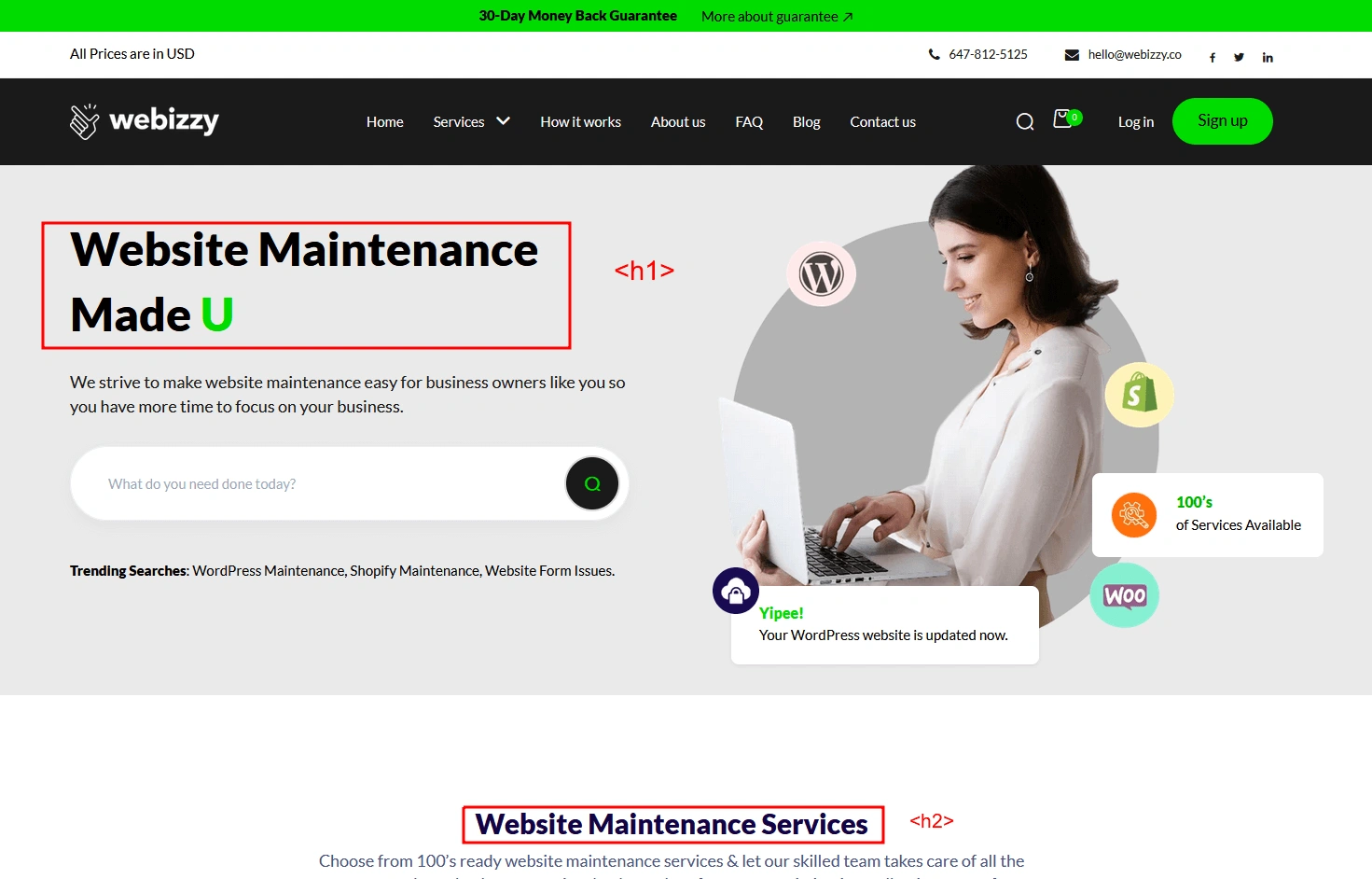
Image source: www.websitemaintenanceservices.store
There are several reasons why well-structured content is essential for SEO.
- It improves the user experience: by providing clear and organized information. When users can easily find what they’re looking for and navigate through your content effortlessly, they are more likely to stay on your website longer, engage with your content, and potentially convert into customers.
- Well-structured content helps search engines understand the context and relevance of your website’s content. By using proper headings, subheadings, and bullet points, you provide clear signals to search engines about the hierarchy and organization of your content. This makes it easier for search engines to crawl and index your pages, resulting in better visibility and higher rankings in search engine results.
- Enhanced SEO Visibility: Well-structured content makes it easier for search engines to understand the relevance and context of your web pages. By organizing your content with appropriate headings, subheadings, and formatting, you provide clear signals to search engines about the importance of different sections. This, in turn, can improve your website’s visibility in search engine results and increase the likelihood of attracting organic traffic.
- Keyword Optimization: Well-structured content allows for effective keyword optimization. By incorporating relevant keywords in headings, subheadings, and throughout your content, you signal to search engines the main topics and themes of your web pages. This can boost your rankings for specific search queries and improve the overall relevance of your content.
- Increased Accessibility: Structured content enhances accessibility for all users, including those with disabilities or visual impairments. By using proper heading tags, descriptive alt text for images, and semantic markup, you ensure that your content is accessible and can be easily understood by assistive technologies. This inclusive approach not only benefits users but can also positively impact your SEO performance.
- Better Content Organization and Scan Ability: Well-structured content improves the overall organization and scan ability of your web pages. By breaking your content into logical sections with clear headings, users can quickly scan and find the information they are looking for. This leads to a better user experience and encourages users to spend more time engaging with your content, ultimately increasing the chances of conversions.
Images play a significant role in enhancing the visual appeal of a website and engaging users. However, if not optimized correctly, images can negatively impact page load times and overall website performance.
Guidelines for creating well-structured content:
- Employ heading tags (such as H1, H2, etc.) to establish a clear hierarchy of information, making it easier for both users and search engines to grasp the organization of your content.
- Naturally include relevant keywords within your headings and subheadings, as this can aid in signaling the key themes and topics of your content to search engines.
- Make effective use of bullet points and numbered lists to present information in a concise and easily digestible manner, enhancing readability and user experience.
- Maintain a logical flow of information throughout your content, ensuring that ideas are presented coherently and coherently, allowing users to follow along seamlessly.
7. Internal Linking
Internal linking refers to the practice of linking one page of a website to another page within the same website. It plays a significant role in SEO by establishing connections between different pages and guiding both users and search engines to relevant content. Here are some key benefits of internal linking for SEO:
As mentioned by Marieke (from Yoast) in the following video, Google utilizes links to explore website content and determine its ranking in search results. When a post or page receives numerous links, it serves as a signal to Google that the content holds significance or is of high value. This applies to both internal and external links.
Video source: www.yoast.com
Key benefits of internal linking for SEO:
- Improved Website Navigation: Internal links help users navigate your website more easily by providing clear pathways to related and relevant content. This enhances the user experience and keeps visitors engaged on your site for longer.
- Enhanced Indexing and Crawling: Internal links enable search engine crawlers to discover and index your website’s pages more effectively. By linking to important pages from within your site, you increase the chances of those pages being crawled and indexed by search engines.
- Keyword Relevance and Rankings: By strategically incorporating internal links with relevant anchor text, you can indicate to search engines the keyword relevance of the linked page. This can contribute to higher rankings for those keywords in search engine results pages (SERPs).
- Page Authority Distribution: Internal linking allows you to distribute the authority or “link juice” from high-authority pages to other pages on your website. By linking to less authoritative pages, you can help boost their visibility and improve their chances of ranking higher in search results.
To implement effective internal linking strategies, consider the following:
- Include relevant and descriptive anchor text when creating internal links.
- Link to pages that are contextually related to the content being linked.
- Avoid excessive linking or over-optimization, as it can be seen as manipulative by search engines.
- Ensure a natural flow and logical structure when organizing your internal links.
- Regularly audit and update your internal links to ensure they remain relevant and functional.
Need a Website That Grows Your Business?
Free Consultation • No Hidden Fees • 100% Confidential
8. User Experience (UX) Design
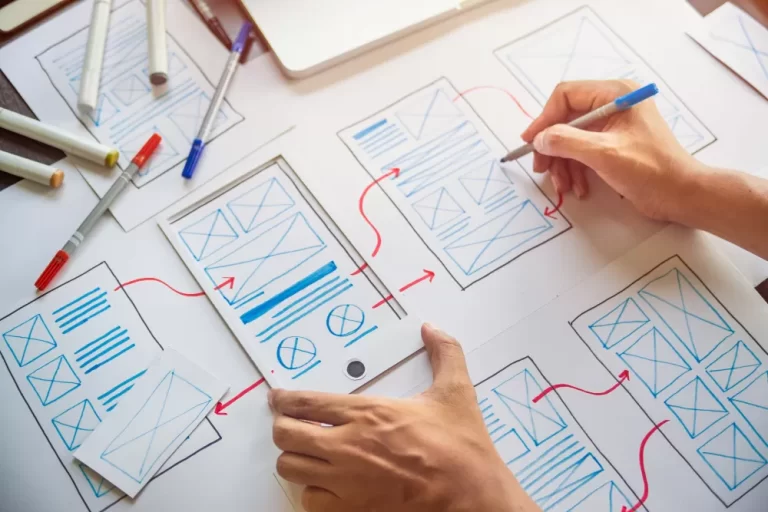
The purpose of UX design is to understand the needs and expectations of users and align them with the goals of the product or website. It involves conducting user research, creating user personas, and developing user flows and wireframes to guide the design process.
Wikipedia describes User Experience (UX) Design as:
User experience design is the process of defining the experience a user would go through when interacting with a company, its services, and its products.] Design decisions in UX design are often driven by research, data analysis, and test results rather than aesthetic preferences and opinions.
In the context of website design, UX design focuses on creating a seamless and enjoyable browsing experience for visitors. This includes considerations such as clear and intuitive navigation, responsive design for various devices, fast page loading speed, visually appealing layouts, and engaging content presentation.
By prioritizing user needs and preferences, UX design aims to enhance user satisfaction, encourage longer visit durations, and ultimately drive conversions and achieve business goals.
Here are some key points highlighting the impact of UX on SEO and the importance of designing for easy navigation and user engagement:
- Lower Bounce Rates: User Experience (UX) plays a crucial role in reducing bounce rates, which is the percentage of users who leave a website after viewing only one page.
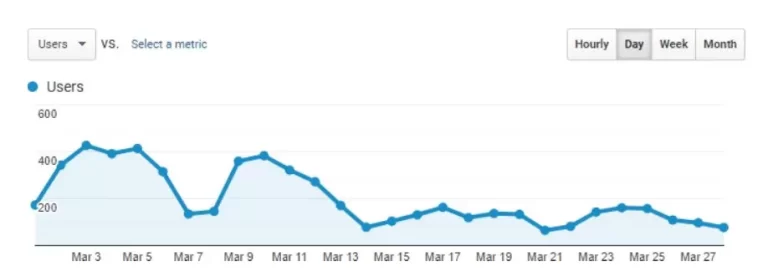
When a website is well-designed with intuitive navigation, engaging content, and fast-loading pages, visitors are more likely to stay and explore further. This signals to search engines that the website provides valuable and relevant information, leading to improved SEO rankings.
- Longer Visit Durations: UX design that focuses on delivering a positive user experience encourages visitors to spend more time on the website.
When users find the website easy to navigate, visually appealing, and informative, they are more likely to engage with the content, read multiple pages, and interact with various elements. Longer visit durations indicate to search engines that the website offers valuable content, which can contribute to improved SEO rankings.
- Reduced Pogo-Sticking: Pogo-sticking refers to when users quickly click back from a search engine result page to try another result.
This behavior suggests that the initial website did not meet the user’s expectations or provide the desired information. By designing a website with good UX, including relevant and compelling content, users are more likely to find what they’re looking for and stay on the website, reducing pogo-sticking. This positive user behavior can have a positive impact on SEO rankings.
- Increased Social Sharing: UX design that prioritizes user engagement and satisfaction can lead to increased social sharing of website content.
When users have a positive experience on a website, they are more likely to share it with their networks on social media platforms. This can result in greater visibility, increased traffic, and potential backlinks, all of which contribute to improved SEO rankings.
- Improved Mobile Experience: With the increasing use of mobile devices for browsing the internet, having a website that provides a seamless mobile experience is essential.
Mobile-friendly UX design ensures that the website is responsive, loads quickly, and offers easy navigation and readability on smaller screens. Since search engines prioritize mobile-friendly websites in their mobile search results, having a well-optimized mobile UX can positively impact SEO rankings.
9. Social Media Integration
In today’s digital landscape, social media has become an integral part of our lives. It’s not just a platform for connecting with friends and sharing personal experiences; it has also emerged as a powerful tool for businesses to reach and engage with their target audience.
When it comes to website design, integrating social media has become essential for leveraging the full potential of online presence and optimizing for search engine visibility.
By implementing effective social media integration strategies, you can enhance your website’s visibility, increase brand awareness, drive traffic, and improve user engagement – all contributing to a successful SEO strategy.
Let’s dive deeper.
- Increased Website Visibility: Integrating social media into your website design allows you to expand your online presence and reach a wider audience. By incorporating social media sharing buttons and widgets, you enable visitors to easily share your content on their social networks. This can lead to increased visibility, as more people discover and engage with your website.
- Improved Brand Awareness: Social media integration helps enhance brand awareness by promoting your website and content to a larger audience. When visitors share your content on social media platforms, it exposes your brand to their followers and connections, increasing the chances of new users discovering and visiting your website. This can lead to brand recognition and a growing audience base.
- Enhanced Engagement and User Interaction: Social media integration encourages user engagement by providing opportunities for visitors to like, comment on, and share your content directly from your website. This creates a sense of community and encourages interaction, which can lead to increased user satisfaction and loyalty.
- Social Signals and SEO Rankings: Social media activity and engagement can indirectly impact your website’s SEO rankings. When your content is shared and linked to social media platforms, it generates social signals that search engines consider a measure of relevance and popularity. This can positively influence your SEO rankings and organic search visibility.
- Increased Website Traffic: Integrating social media into your website design can drive more traffic to your site. When users share your content on social media, it can attract new visitors who are interested in your niche or industry. This influx of traffic can lead to higher website visibility, more page views, and potential conversions.
- Improved Backlink Opportunities: Social media integration can open doors to backlink opportunities. When your content is shared and promoted on social media platforms, it increases the chances of other websites and influencers linking back to your website. These backlinks are valuable for SEO, as they signal to search engines that your website is reputable and authoritative.
- Increased Social Proof and Trust: When visitors see social media integration on your website, such as displaying your social media follower counts or showcasing social media testimonials, it enhances social proof and builds trust. Social proof plays a significant role in influencing user behavior and can positively impact your website’s credibility and conversions.
Keep in mind that while social media may not directly influence your search rankings, it plays a crucial role in boosting your online visibility, driving website traffic, and generating valuable social signals that can positively impact your SEO performance. By integrating social media with other SEO strategies, you can enhance your overall online presence and reinforce your search engine optimization efforts.
Need a Website That Grows Your Business?
Free Consultation • No Hidden Fees • 100% Confidential
Wrap up!
Implementing these nine essential SEO strategies for awebsite design can significantly improve your website’s visibility, organic traffic, and overall search engine optimization performance
By optimizing your website’s structure, incorporating relevant keywords, focusing on user experience, and leveraging social media integration, you can create a website that not only appeals to users but also ranks well in search engine results
Remember to regularly monitor and analyze your website’s performance, adapt to algorithm changes, and stay up to date with the latest SEO trends to ensure long-term success. With a well-designed and SEO-friendly website, you’ll be on the right path to unlocking online success.